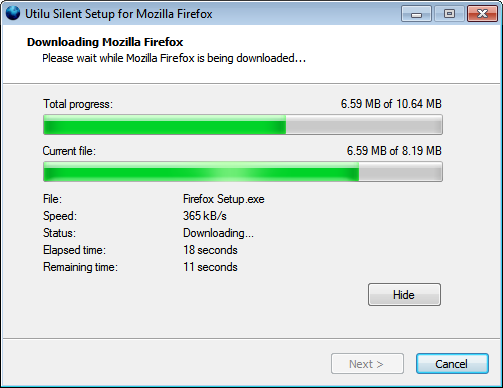
Edskes Software Silent Setup for Mozilla Firefox is a multilingual utility which automatically downloads and installs the latest version of Mozilla Firefox.
Edskes Software Silent Setup for Mozilla Firefox is een meertalig programma dat automatisch de nieuwste versie van Mozilla Firefox download en installeert.

What is an Internet web browser?

An Internet browser is computer software that allows you to surf the Internet using an Internet connection. It takes you from website to website and displays the pages for you (like the one you’re reading now).

Internet web browsers are Internet browsers which conform to the official web standards, so websites work identically and are displayed correctly in all web browsers.

There are many different web browsers. Examples are Mozilla Firefox, Google Chrome, Apple Safari and Opera.

Internet Explorer is an example of a browser that isn’t a web browser.

Wat is een Internet webbrowser?

Een Internet browser is computer software die gebruikt wordt om over het web te surfen via een Internetverbinding. Browsers bieden de mogelijkheid om van website naar website te navigeren en de pagina’s te tonen (zoals de pagina welke u nu leest).

Internet webbrowsers zijn Internet browsers die aan de officiële webstandaarden voldoen, waardoor websites in alle webbrowsers hetzelfde werken en correct worden weergegeven.

Er zijn veel verschillende webbrowsers. Voorbeelden zijn Mozilla Firefox, Google Chrome, Apple Safari en Opera.

Internet Explorer is een voorbeeld van een browser die geen webbrowser is.

Are all browsers the same?

No, not all browsers are the same.

For example the browser Internet Explorer from Microsoft, which is installed by default in Windows, isn’t a good browser:

Because of these reasons it’s very important that people use an Internet web browser and not Internet Explorer.

Zijn alle browsers even goed?

Nee, niet alle browsers zijn even goed.

Bijvoorbeeld de browser Internet Explorer van Microsoft, welke in Windows standaard is geïnstalleerd, is geen goede browser:

Vanwege bovenstaande redenen is het heel belangrijk is dat mensen een Internet webbrowser gebruiken en niet Internet Explorer.
A difference that you’ll see is that the background of images in Internet Explorer is grey, while the background should be transparent (like it is in web browsers).
Een zichtbaar verschil is dat de achtergrond van afbeeldingen in Internet Explorer grijs is, terwijl de achtergrond transparant zou moeten zijn (en dat ook is in webbrowsers).
Internet Explorer

Mozilla Firefox:

Mozilla Firefox

Internet Explorer:

Internet Explorer

Bye IE

Internet Explorer

Why is Mozilla Firefox a good web browser?

Mozilla Firefox is a free web browser that offers a safer, faster and better way to surf the Internet and displays pages the way they were intended to be, since Firefox does follow the official web standards. Firefox also gives you more web page viewing space, so you can view more of a web page without scrolling. Also text is displayed clearer in Firefox.

Hundreds of millions of people worldwide have already switched to Firefox and are enjoying a better web experience.

Firefox can import your existing settings from Internet Explorer. An import wizard will run when you install Firefox (and is also available later), which can import (copy to Firefox) your Favorites, preferences, history, cookies, stored passwords and a variety of other data.

Waarom is Mozilla Firefox een goede webbrowser?

Mozilla Firefox is een gratis webbrowser welke een veiligere, snellere en betere manier biedt om over het Internet te surfen en pagina’s weergeeft zoals ze bedoeld zijn, omdat Firefox zich aan de officiële webstandaarden houdt. Firefox geeft ook een groter deel van een website weer, waardoor er zonder te hoeven scrollen meer van de pagina bekeken kan worden. Ook wordt tekst helderder weergegeven in Firefox.

Wereldwijd zijn er al honderden miljoenen mensen overgestapt op Firefox die sindsdien het web beter kunnen gebruiken.

Indien gewenst kan Firefox de bestaande instellingen van Internet Explorer importeren. Een importeerassistent zal worden gestart na installatie van Firefox (deze is ook later nog beschikbaar), welke uw Favorieten, voorkeuren, in het verleden opgevraagde pagina’s, cookies, opgeslagen wachtwoorden en andere gegevens kan importeren (kopiëren naar Firefox).

How do I install Mozilla Firefox?

Mozilla Firefox can be installed by running Edskes Software Silent Setup for Mozilla Firefox once.

Starting Edskes Software Silent Setup for Mozilla Firefox is very easy:

  1. Click on Edskes Software Silent Setup for Mozilla Firefox
  2. Click on Run (usually twice)
  3. Choose your preferred language and click on OK
  4. Close your browser (like always)
  5. From now on everything will go automatically (this may take a few minutes)
  6. You’ll be asked to import (copy to Firefox) your settings
  7. Firefox will be started and you’ll see the website the way it’s supposed to be

Hoe installeer ik Mozilla Firefox?

Mozilla Firefox installeren gaat het makkelijkste door eenmalig Edskes Software Silent Setup for Mozilla Firefox uit te voeren.

Edskes Software Silent Setup for Mozilla Firefox starten is heel eenvoudig:

  1. Klik op Edskes Software Silent Setup for Mozilla Firefox
  2. Klik op Uitvoeren (meestal twee keer)
  3. Kies de gewenste taal en klik op OK
  4. Sluit uw browser (op de gebruikelijke manier)
  5. Vanaf nu gaat alles vanzelf (dit kan een paar minuten duren)
  6. Er zal gevraagd worden om uw instellingen in Firefox te importeren (kopiëren naar Firefox)
  7. Firefox zal worden gestart en de website zal worden getoond zoals deze bedoeld is

About Mozilla Firefox

Mozilla Firefox is a web browser developed by the Mozilla Corporation in cooperation with the community and is based on the Gecko render engine.

Mozilla Firefox is a registered trademark of the Mozilla Foundation.

Reasons to use Mozilla Firefox:

Over Mozilla Firefox

Mozilla Firefox is een webbrowser ontwikkeld door de Mozilla Corporation en veel vrijwilligers en is gebaseerd op de Gecko-rendermachine.

Mozilla Firefox is een geregistreerd merk van de Mozilla Foundation.

Redenen om Mozilla Firefox te gebruiken:

About Edskes Software Silent Setup for Mozilla Firefox

Compatible with Windows 7

Edskes Software Silent Setup for Mozilla Firefox is a small multilingual utility developed by Edskes Software which after approval automatically downloads and installs the latest version of Mozilla Firefox, and then immediately opens one or more websites.

Features:

Over Edskes Software Silent Setup for Mozilla Firefox

Compatible met Windows 7

Edskes Software Silent Setup for Mozilla Firefox is een klein meertalig hulpprogramma ontwikkeld door Edskes Software dat na goedkeuring volautomatisch de meest recente versie van Mozilla Firefox voor het gebruikte besturingssysteem kan downloaden en installeren, om er vervolgens direct één of meerdere websites in te openen.

Kenmerken:

Why automatically installing a browser?

The following explanation is written for web developers.

Most users just use the browser that was on their computer when they got it, which is Internet Explorer (IE) in most cases, since most people use Microsoft Windows. Often they don’t even know what the word “browser” means: they just click on “Internet” (Explorer) when they want to visit a website: if there would be an icon on their desktop called “Internet” (Firefox) then they would click on it too. So these users don’t care at all which browser they use, as long as (they think) it works.

These users will also never upgrade their browser as long as it keeps working, unless upgrading goes fully automatically (that’s why so many people still use Internet Explorer 6.0: it came with their computer and they just haven’t ever upgraded it, because they’re used to close every window they don’t know, in spite of the fact that none of these people intends to use outdated and bad technology). By themselves these people would never go looking for another browser. And even if they would they still have no idea how to download and install it.

For web developers this causes a lot of trouble and (otherwise unnecessary) additional work to make the sites they need to build work and look right in browsers like Internet Explorer. These browsers don’t usually follow the web standards and contain a lot of weird bugs. That’s where Edskes Software Silent Setup for Mozilla Firefox comes in. It’s an installer which offers, for example, Internet Explorer using visitors of a website the easiest possible way to download and view the website in a web browser like Mozilla Firefox. Of course Mozilla Firefox is not the only web browser, but together with Google Chrome and Opera it’s one of the few web browsers which can work even under the most restricted user accounts, which is very important since you want your website to work and look right for every visitor.

Waarom automatisch een browser installeren?

Onderstaande uitleg is geschreven voor webontwikkelaars.

De meeste mensen gebruiken de browser die op hun computer stond toen ze hem kregen, in de meeste gevallen is dat Internet Explorer (IE), aangezien de meeste mensen Microsoft Windows gebruiken. Ze weten echter vaak niet wat er met het woord “browser” bedoeld wordt: ze klikken gewoon op “Internet” (Explorer) wanneer ze een website willen bezoeken: als er een icoon op hun bureaublad zou staat met de naam “Internet” (Firefox) zouden ze er net zo goed op klikken. Het maakt deze gebruikers dus niets uit welke browser ze gebruiken, zo lang (ze denken dat) het werkt.

Deze gebruikers werken hun browser ook nooit bij zolang deze nog werkt, tenzij het bijwerken volautomatisch gaat (dat is ook de reden dat er nog steeds zoveel mensen Internet Explorer 6.0 gebruiken: het stond op hun computer toen ze die kregen en ze hebben sindsdien niets bijgewerkt, omdat ze gewend zijn elk venster wat ze niet kennen te sluiten, ondanks dat geen van deze mensen op zich graag oude en slechte technologie willen gebruiken). Uit zichzelf zullen deze mensen nooit op zoek gaan naar een andere browser. En zelfs als ze dat wel zouden doen dan zouden ze geen idee hebben hoe ze die moeten downloaden en installeren.

Voor webontwikkelaars betekent dit een heleboel extra moeite en (anders onnodig) extra werk om ervoor te zorgen dat de te bouwen sites ook werken en er goed uitzien in browsers zoals Internet Explorer, die niet voldoen aan de standaarden en waarin veel rare onverklaarbare fouten zitten. Een oplossing hiervoor is Edskes Software Silent Setup for Mozilla Firefox. Het is een installatieprogramma, welke bezoekers die een website met bijvoorbeeld Internet Explorer bezoeken de makkelijkst mogelijke manier biedt om de website in een webbrowser, zoals Mozilla Firefox, te zien. Uiteraard is Mozilla Firefox niet de enige webbrowser, maar samen met Google Chrome en Opera is het een van de weinige webbrowsers die zelfs onder de meest beperkte gebruikersaccounts werken, wat heel belangrijk is omdat een website bij iedere bezoeker goed moet werken er en goed uit moet zien.

What does Edskes Software Silent Setup for Mozilla Firefox do?

If the website with Edskes Software Silent Setup for Mozilla Firefox is visited by someone with a browser like Internet Explorer, the visitor will see a message telling him or her to run the program if the visitor wants to be able to use all functionality of the website. Since it offers a very easy way to install Mozilla Firefox even inexperienced computer users and users with a restricted user account (so you know it’ll work for everyone), who otherwise wouldn’t get past the - for them difficult - questions the normal installer asks, can use Mozilla Firefox. Also it doesn’t only install Mozilla Firefox, but can also immediately open websites in it (like the website in Internet Explorer from which it was started).

So Edskes Software Silent Setup for Mozilla Firefox allows web developers to require Mozilla Firefox. Any other web browser, like Google Chrome or Opera, is fine too, but note that Apple Safari can’t always be installed, because it requires Administrative privileges. By including Edskes Software Silent Setup for Mozilla Firefox on their website web developers no longer have to waste hours and hours on problems which occur only in non-standard compliant browsers. For every website they can decide if they target all versions of Internet Explorer, or only older ones (for example only Internet Explorer version 1.0 through 7.0).

When a website which includes Edskes Software Silent Setup for Mozilla Firefox is visited with a non-standard compliant browser, like Internet Explorer, the following happens:

This is just how Flash gets installed anywhere: Flash just says “click here to view this”, which results in Flash being installed. This works great, because Flash is not installed by default while the installed base of Flash is over 99% percent.

Hoe werkt Edskes Software Silent Setup for Mozilla Firefox?

Wanneer een website met Edskes Software Silent Setup for Mozilla Firefox bezocht wordt door iemand met een browser zoals Internet Explorer, dan zal de bezoeker een melding krijgen om het programma uit te voeren, zodat alle mogelijkheden van de website gebruikt kunnen worden. Aangezien het een heel gemakkelijke manier biedt om Mozilla Firefox te installeren kunnen ook onervaren computergebruikers en gebruikers met beperkte gebruikersaccounts, die anders niet voorbij de - voor hen gecompliceerde - vragen komen die het gewone installatieprogramma stelt, Mozilla Firefox gebruiken. Ook installeert het niet alleen Mozilla Firefox, maar kan het ook direct websites in Firefox tonen (zoals de website in Internet Explorer waar vanaf het was gestart).

Edskes Software Silent Setup for Mozilla Firefox maakt het voor webontwikkelaars dus mogelijk om Mozilla Firefox te vereisen voor het bekijken en gebruiken van hun website. Een andere webbrowser, zoals Google Chrome of Opera, is natuurlijk ook goed, maar let op dat Apple Safari niet altijd geïnstalleerd kan worden, aangezien deze beheerdersrechten vereist. Door Edskes Software Silent Setup for Mozilla Firefox te gebruiken hoeven webontwikkelaars niet meer uren en uren te verspillen aan problemen die alleen optreden in browsers die zich niet aan de standaarden houden. Per website kan worden besloten of Edskes Software Silent Setup for Mozilla Firefox gebruikt moet worden bij alle versies van Internet Explorer, of alleen bij oudere versies (bijvoorbeeld Internet Explorer versie 1.0 tot en met 7.0).

Wanneer een website met Edskes Software Silent Setup for Mozilla Firefox bezocht wordt met een browser die niet aan de standaarden voldoet, zoals Internet Explorer, gebeurt het volgende:

Dit is net zoals Flash overal geïnstalleerd wordt: Flash zegt gewoon “klik hier om dit te zien”, wat resulteert in het installeren van Flash. Dit werkt uitstekend, omdat Flash standaard niet is geïnstalleerd, terwijl Flash op meer dan 99% procent van de computers aanwezig is.

Frequently Asked Questions

Question:
Is it possible to install Mozilla Firefox without using the Internet connection?
Answer:
Sure. In that case it’s needed that the installer of Mozilla Firefox is located in the same folder (directory) as Edskes Software Silent Setup for Mozilla Firefox and that it has the correct filename.

The correct filenames are:

FirefoxEN.exe (English) or FirefoxNL.exe (Dutch) for Mozilla Firefox 3 (when using Windows 2000, XP, 2003, Vista, 2008 or 7)

FirefoxEN2.exe (English) or FirefoxNL2.exe (Dutch) for Mozilla Firefox 2 (when using Windows 98, 98 SE, ME or NT).

It works perfectly fine when other versions of Mozilla Firefox (for other operating systems and languages) are in the same folder (directory) too: when Edskes Software Silent Setup for Mozilla Firefox is run it will automatically pick the right version.

The filename for Flash is install_flash_player.exe (Language neutral).

Question:
Is it possible to specify where Mozilla Firefox should be installed?
Answer:
Yes, this is possible by entering the parameter/D=Directory”, where “Directory” should be the full path to the directory to install Mozilla Firefox into. The path may always be quoted, but the quotes are only needed if the path contains spaces. Example:

EdskesMF.exe /D="C:\Mozilla Firefox"

The installer must have write access to the installation directory. Also the directory must already exist. If any of these conditions are not met the installer will ignore the parameter.

Question:
Is it possible to automatically choose the desired language of Edskes Software Silent Setup for Mozilla Firefox?
Answer:
Yes, this is possible by entering the parameter/LANG=EN” for English, or “/LANG=NL” for Dutch.

In the following example Edskes Software Silent Setup for Mozilla Firefox will immediately start in English, instead of asking which language to use:

EdskesMF.exe /LANG=EN

Question:
Is it possible to run Edskes Software Silent Setup for Mozilla Firefox automatically, without it being visible?
Answer:
Yes, this is possible by entering the parameter/VERYSILENT”.

When this parameter is entered Edskes Software Silent Setup for Mozilla Firefox won’t be visible. Example:

EdskesMF.exe /VERYSILENT

Question:
Is it possible to let Edskes Software Silent Setup for Mozilla Firefox immediately create a profile, without running the Import Wizard?
Answer:
Yes, this is possible by entering the parameter/CREATEPROFILE”.

When this parameter is entered Edskes Software Silent Setup for Mozilla Firefox won’t show the Import Wizard, but instead immediately create a new profile, without importing anything. Example:

EdskesMF.exe /CREATEPROFILE

Question:
Is it possible to combine multiple parameters?
Answer:
Yes, this is possible by entering them all space separated. Example:

EdskesMF.exe /D="C:\Firefox" /LANG=EN /VERYSILENT /CREATEPROFILE

You can find more information about Edskes Software Silent Setup for Mozilla Firefox on the websites mentioned below, or ask a question yourself.

Veelgestelde Vragen

Vraag:
Is het ook mogelijk om Mozilla Firefox te installeren zonder de Internetverbinding te gebruiken?
Antwoord:
Ja, dat kan. Hiervoor is het nodig dat het installatieprogramma van Mozilla Firefox zich in dezelfde map (directory) bevindt als Edskes Software Silent Setup for Mozilla Firefox en deze de juiste bestandsnaam heeft.

De juiste bestandsnamen zijn:

FirefoxNL.exe (Nederlandstalig) of FirefoxEN.exe (Engelstalig) voor Mozilla Firefox 3 (in het geval van Windows 2000, XP, 2003, Vista, 2008 of 7)

FirefoxNL2.exe (Nederlandstalig) of FirefoxEN2.exe (Engelstalig) voor Mozilla Firefox 2 (in het geval van Windows 98, 98 SE, ME of NT).

Het is geen probleem wanneer Edskes Software Silent Setup for Mozilla Firefox wordt uitgevoerd terwijl (ook) versies van Mozilla Firefox voor andere besturingssystemen of in andere talen aanwezig zijn: de juiste versie zal automatisch gebruikt worden.

De bestandsnaam voor Flash is install_flash_player.exe (Taalonafhankelijk).

Vraag:
Is het mogelijk om bij de installatie op te geven waar Mozilla Firefox moet worden geïnstalleerd?
Antwoord:
Ja, dat is mogelijk door als parameter/D=Directory” op te geven, waarbij “Directory” het volledige pad is naar de directory waarin Mozilla Firefox moet worden geïnstalleerd. Het pad mag altijd tussen aanhalingstekens staan, maar dit is alleen nodig bij spaties in het pad. Voorbeeld:

EdskesMF.exe /D="C:\Mozilla Firefox"

Het installatieprogramma moet schrijfrechten in de installatiedirectory hebben. Ook moet de directory al bestaan. Wanneer aan een van deze voorwaarden niet wordt voldaan zal het installatieprogramma de parameter negeren.

Vraag:
Is het mogelijk om de gewenste taal al voor installatie op te geven aan Edskes Software Silent Setup for Mozilla Firefox?
Antwoord:
Ja, dat is mogelijk door als parameter/LANG=NL” voor Nederlands, of “/LANG=EN” voor Engels op te geven.

In het volgende voorbeeld zal Edskes Software Silent Setup for Mozilla Firefox direct in het Nederlands starten, en dus niet om de taal vragen:

EdskesMF.exe /LANG=NL

Vraag:
Is het mogelijk om Edskes Software Silent Setup for Mozilla Firefox geautomatiseerd uit te laten voeren, dus zonder dat dit zichtbaar is?
Antwoord:
Ja, dit is mogelijk door als parameter/VERYSILENT” op te geven.

Wanneer deze parameter is opgegeven zal het niet zichtbaar zijn dat Edskes Software Silent Setup for Mozilla Firefox bezig is. Voorbeeld:

EdskesMF.exe /VERYSILENT

Vraag:
Is het mogelijk om Edskes Software Silent Setup for Mozilla Firefox direct al een profiel aan te laten maken, zodat de Importeerassistent niet wordt uitgevoerd?
Antwoord:
Ja, dit is mogelijk door als parameter/CREATEPROFILE” op te geven.

Wanneer deze parameter is opgegeven zal Edskes Software Silent Setup for Mozilla Firefox in plaats van het uitvoeren van de Importeerassistent direct een nieuw profiel aanmaken, zonder iets te importeren. Voorbeeld:

EdskesMF.exe /CREATEPROFILE

Vraag:
Is het mogelijk om meerdere parameters tegelijk op te geven?
Antwoord:
Ja, dit is mogelijk door ze allemaal achter elkaar te zetten, met een spatie tussen elke parameter. Voorbeeld:

EdskesMF.exe /D="C:\Firefox" /LANG=NL /VERYSILENT /CREATEPROFILE

Kijk voor meer informatie over Edskes Software Silent Setup for Mozilla Firefox op onderstaande websites, of stel zelf een vraag.

Example websites including Edskes Software Silent Setup for Mozilla Firefox:
Voorbeelden van websites met Edskes Software Silent Setup for Mozilla Firefox:
More information about Edskes Software Silent Setup for Mozilla Firefox:
Meer informatie over Edskes Software Silent Setup for Mozilla Firefox:

Summary

Edskes Software Silent Setup for Mozilla Firefox is a small multilingual utility which after approval automatically downloads and installs the latest version of Mozilla Firefox, and then immediately opens one or more websites.

It asks no difficult questions and does not show technical information or error messages and even works under the most restricted user accounts, so you can quickly use Firefox on any computer and also easily explain how to install Firefox to anyone else.

Since it always works and is very simple to use, you can include it on your website, so you do not have to code for non-standard compliant browsers anymore.

Samenvatting

Edskes Software Silent Setup for Mozilla Firefox is een klein meertalig hulpprogramma dat na goedkeuring automatisch de nieuwste versie van Mozilla Firefox download en installeert om er vervolgens direct één of meerdere websites in te openen.

Het stelt geen lastige vragen en toont geen technische gegevens noch foutmeldingen en werkt zelfs onder de meest beperkte gebruikersaccounts, waardoor het mogelijk is om Firefox snel op elke willekeurige computer te gebruiken en ook eenvoudig aan iedereen is uit te leggen hoe Firefox te installeren.

Omdat het in alle omstandigheden werkt en heel eenvoudig is te gebruiken, kan het aan een website worden toegevoegd, waardoor er geen extra ontwikkelwerk meer gedaan hoeft te worden voor browsers die niet aan de standaarden voldoen.

Download

Edskes Software Silent Setup for Mozilla Firefox 1.0.1.2 (532 kB, 545.103 bytes)

MD5 Hash: e91b8283b742f46dcb747180ea9a1736

Awards

Award Best Freeware Download Award Best Software 4 Download Award Best Vista Downloads Award BetaNews Award BrotherSoft Award Chip Award CNET Award CNET Download Award CPU Award Download3K Award Download3K Clean Award Download.hr Award DownloadRage Award Downloads2k Award Downloads2k Clean Award DownloadToPC Award DownloadTube Award FamousWhy Award FiberDownload Award FiberDownload Pick Award FileCart Award FileCluster Award FileFirm Award Final Download Award Free Downloads Place Award GearDownload Editor’s Choice Award GearDownload Award GearDownload Clean Award InfoWorld Award MaxxDownload Award MostShareware Award PC Advisor Gold Award PC Answers Award PC Authority A-List Award PC Authority Recommended Award PC Magazine Award PC Pro Award PCPlus Award PCUser Award PCUtilities Award Program URL Award Qweas Award RoSoftDownload Award Shareware Award SnapFiles Award SofoTex Award Soft82 Award Soft82 Award SoftCetera Award SoftDownload22 Award Softonic Award Softpedia Award Softpedia Pick Award SoftSea 5 Stars Award SoftSea Clean Award SoftSea Pick Award SoftSea Compatible Award Softpile Award SoftsLand Award SoftSpecialist Award SuggestSoft Award The Register Award Top 4 Download Award Top 4 Download Clean Award Tucows Award UpdateStar Award Uptodown Award Windows XP Award Windows 7 Download Pick Award Windows 7 Download Award Windows 7 Download Clean Award Windows 7 Download Compatible Award WinTotal Award x64-bit Download Award x64-bit Download Compatible Award ZDNet Award Zigg Downloads

Copyright ©

Hilbrand Edskes

Edskes Software

hilbrand a edskes.com